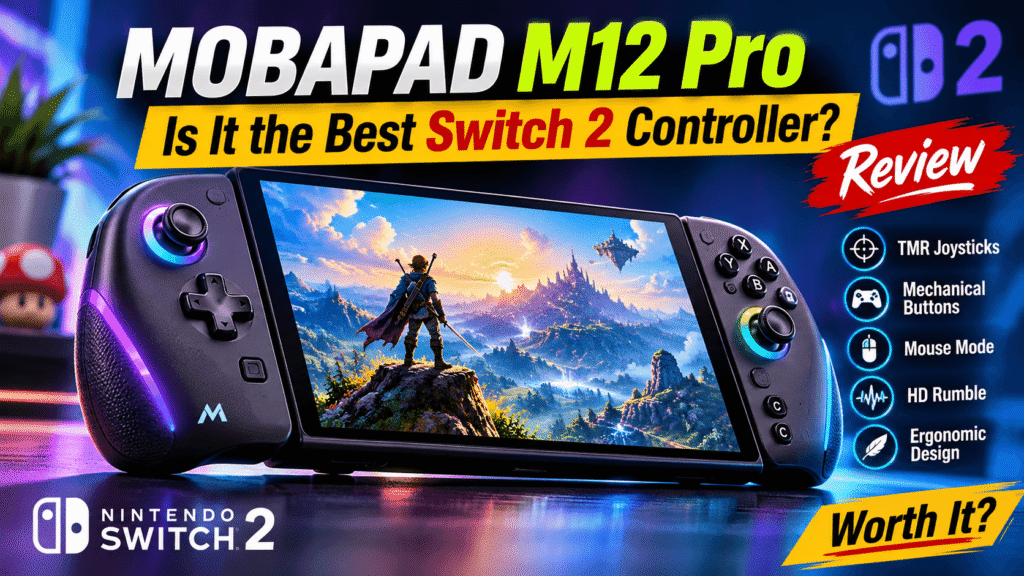
Unlike many alternative handheld controllers, the MOBAPAD M12 Pro aims to retain the features players expect from the original Joy-Con 2 while improving comfort and physical controls. It also includes NFC support, motion sensing, customizable rear buttons, and a dedicated C button.
But does the MOBAPAD M12 Pro justify its premium price, and is it a better choice than Nintendo’s standard Joy-Con 2?
Here’s what you should know before buying.
What Is the MOBAPAD M12 Pro?
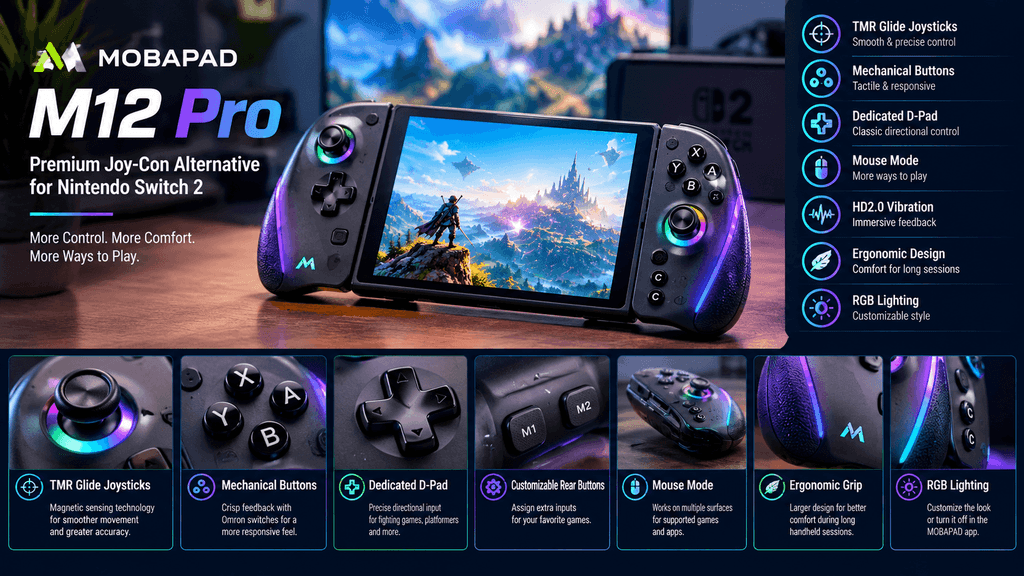
The MOBAPAD M12 Pro is a premium split-controller set designed for the Nintendo Switch 2. It replaces the standard Joy-Con 2 with larger, more ergonomic controllers intended to improve comfort during extended handheld gaming sessions.
Its biggest selling point is the combination of traditional Joy-Con functionality and upgraded physical controls.
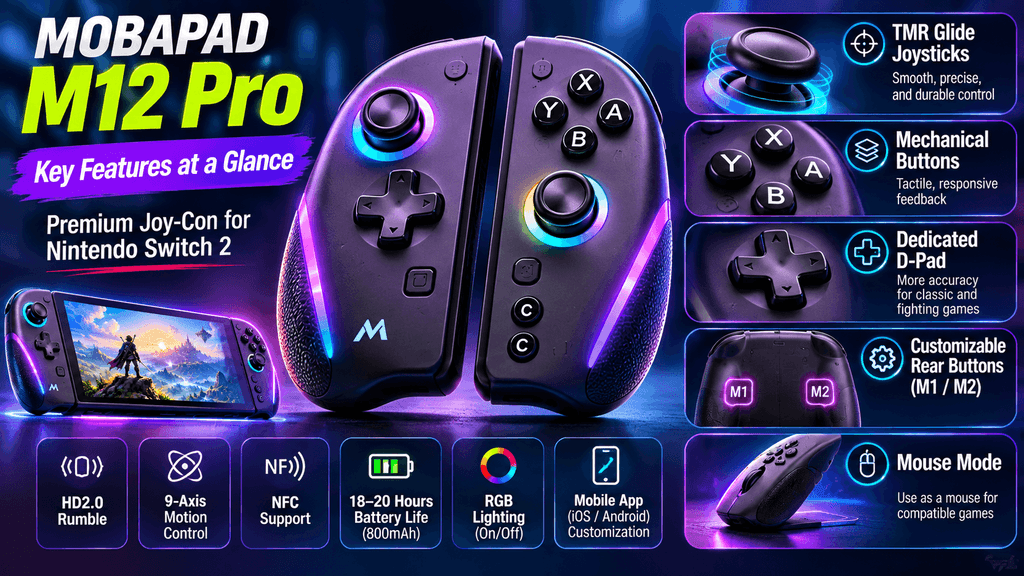
The controller includes TMR Glide joysticks, mechanical ABXY buttons, a dedicated D-pad, programmable M1 and M2 buttons, and HD2.0 vibration technology.
MOBAPAD has also included features that were missing from its earlier M12 HD model, particularly mouse functionality and improved compatibility with the Switch 2 system.
For players who spend hours playing RPGs, action games, fighting games, or competitive titles in handheld mode, these changes could make a noticeable difference.
MOBAPAD M12 Pro Features and Specifications
The MOBAPAD M12 Pro offers a range of hardware features aimed at players who want more control and comfort from their Nintendo Switch 2.
| Specification | MOBAPAD M12 Pro |
|---|---|
| Platform | Nintendo Switch 2 |
| Controller type | Split Joy-Con-style controller |
| Joysticks | TMR Glide |
| Buttons | Mechanical ABXY |
| D-pad | Mechanical D-pad |
| Rear buttons | Customizable M1/M2 |
| Motion sensing | 9-axis |
| NFC | Supported |
| Vibration | MOBAPAD HD2.0 |
| Mouse mode | Supported |
| Wireless connection | Bluetooth 5.3 |
| Wired connection | Supported |
| Battery capacity | 800mAh |
| Estimated battery life | 18–20 hours without vibration |
| Mobile application | Android and iOS |
| RGB lighting | Supported |
These specifications make the M12 Pro more than a simple ergonomic replacement for the standard Joy-Con 2.
TMR Glide Joysticks: Better Control for Handheld Gaming
One of the main reasons to consider the MOBAPAD M12 Pro is its TMR Glide joystick technology.
Traditional controller joysticks can experience wear over time, potentially leading to unwanted stick movement and reduced accuracy. TMR technology uses magnetic sensing rather than relying on conventional mechanical contact for position detection.
The M12 Pro’s TMR Glide sticks are designed to deliver smooth movement and precise input.
This can be particularly useful in games that require accurate camera adjustments, controlled movement, and small directional inputs.
Players who enjoy action adventures, first-person games, racing titles, and competitive shooters may appreciate the additional control.
However, TMR technology alone does not guarantee that a controller will never develop problems. Long-term durability still needs to be evaluated through extended use.
Mechanical Buttons and a Dedicated D-Pad
Another major feature of the MOBAPAD M12 Pro is its mechanical button system.
The ABXY buttons and D-pad use mechanical switches with Omron components, while the shoulder controls use TTC switches.
This gives the controller a different physical feel compared with the standard Joy-Con 2.
The mechanical buttons are designed to provide more defined feedback with each press. Players who prefer a noticeable click rather than softer button movement may enjoy this design.
The dedicated D-pad is another welcome addition.
It provides a more traditional directional input arrangement, which can be useful for fighting games, platformers, retro titles, and games that require precise directional commands.
Two customizable rear buttons, M1 and M2, add further flexibility by allowing players to assign additional inputs.
▶ Nintendo Switch 2 Deal: Save $30 at Woot for $469
Mouse Mode Brings More Flexibility to Switch 2
Mouse functionality is one of the most interesting upgrades in the MOBAPAD M12 Pro.
Nintendo Switch 2 introduced mouse-style controls for compatible games, offering another way to interact with supported titles.
The M12 Pro brings this functionality to a third-party ergonomic controller.
According to hands-on testing published by Nintendo Life, its mouse mode works across multiple surfaces, including clothing, with responsive tracking and minimal noticeable delay.
Its larger shape also provides a more comfortable grip while using mouse controls than the standard Joy-Con 2 design.
This feature could be useful for games that support mouse input, particularly strategy games and titles that benefit from more direct pointer control.
However, mouse functionality is not universal. Individual games must support the relevant control mode.
HD2.0 Rumble: More Detailed Vibration Feedback
The MOBAPAD M12 Pro also features the company’s HD2.0 wide-frequency vibration system.
Vibration feedback can make gameplay feel more responsive by communicating movement, impacts, environmental effects, and other in-game events.
The controller allows players to adjust vibration intensity using controller shortcuts.
Nintendo Life’s review praised the vibration performance, describing it as particularly impressive and close to the experience offered by Nintendo’s official Pro Controller.
For players who enjoy games with detailed haptic feedback, this is a welcome addition.
It also helps distinguish the M12 Pro from simpler third-party handheld controllers that sacrifice vibration functionality to reduce costs.
Ergonomic Design and RGB Lighting
Comfort is a major part of the MOBAPAD M12 Pro’s appeal.
The controllers feature a larger body than standard Joy-Con 2 units, providing additional grip space for handheld gaming.
This design may benefit players who find smaller controllers uncomfortable during longer sessions.
The M12 Pro also features a black-to-purple gradient finish with green accents and RGB lighting around its Mobapad logo.
Players who prefer a cleaner appearance can disable the RGB lighting through the MOBAPAD application.
There is one cosmetic disadvantage: the darker surfaces can collect visible fingerprints. Players who prefer lighter controller finishes may also want more color options.
▶ New Video Game Releases: October 2026 and What’s Coming Next
MOBAPAD M12 Pro vs. Nintendo Switch 2 Joy-Con 2
Is the MOBAPAD M12 Pro a better choice than Nintendo’s official Joy-Con 2?
The answer depends on your priorities.
| Feature | MOBAPAD M12 Pro | Official Joy-Con 2 |
|---|---|---|
| Ergonomic grip | Larger design | Compact design |
| Joysticks | TMR Glide | Nintendo standard |
| Mechanical ABXY buttons | Yes | No |
| Dedicated D-pad | Yes | No |
| Customizable rear buttons | Yes | No |
| NFC | Yes | Yes |
| Motion controls | 9-axis | Supported |
| Mouse functionality | Yes | Yes |
| HD rumble | HD2.0 | HD Rumble 2 |
| RGB lighting | Yes | No |
The MOBAPAD M12 Pro focuses on comfort, mechanical controls, and additional customization.
Nintendo’s official Joy-Con 2 remains the natural choice for players who prefer the original compact design and Nintendo’s first-party accessories.
The M12 Pro is more interesting for players who prioritize ergonomic handheld gaming and a traditional controller layout.
MOBAPAD M12 Pro Price: Is It Worth Buying?
The MOBAPAD M12 Pro belongs to the premium third-party controller category.
At the time of writing, MOBAPAD’s official product listing displays a price of $119.99, compared with a listed regular price of $149.99. The product page also displays a sold-out status, so availability and pricing should be checked before purchasing.
That is a significant investment for a pair of handheld controllers.
For comparison, that money could also go toward additional Nintendo Switch 2 games or other accessories.
The value becomes easier to justify if you regularly play in handheld mode and want better grip, more traditional controls, TMR joysticks, and additional customization.
If you are satisfied with the standard Joy-Con 2, spending this much on an alternative may be unnecessary.
Pros and Cons of the MOBAPAD M12 Pro
Pros
- Ergonomic design for handheld gaming.
- Smooth TMR Glide joysticks.
- Mechanical ABXY buttons and dedicated D-pad.
- Two customizable rear buttons.
- Mouse functionality for compatible games.
- NFC and 9-axis motion sensing.
- HD2.0 vibration technology.
- Dedicated C button.
- RGB lighting can be disabled.
Cons
- Premium price compared with standard controllers.
- Dark surfaces can collect fingerprints.
- Limited color choices may not appeal to everyone.
- Larger dimensions may affect compatibility with existing carrying cases.
- Battery-life estimate assumes vibration motors are not operating.
Is the MOBAPAD M12 Pro Worth It for Nintendo Switch 2 Owners?
The MOBAPAD M12 Pro is a compelling option for Nintendo Switch 2 players who want a more comfortable handheld controller without giving up important Joy-Con functionality.
Its TMR joysticks, mechanical buttons, dedicated D-pad, mouse support, and HD2.0 vibration make it an interesting alternative to the standard controllers.
However, its premium price means it is not an automatic purchase for every Switch 2 owner.
Players who spend most of their gaming time in handheld mode may get the most value from its ergonomic design. Those who mainly play with the console docked or are already comfortable with the original Joy-Con 2 may find fewer reasons to upgrade.
Our verdict: The MOBAPAD M12 Pro deserves consideration as a premium Nintendo Switch 2 handheld controller. Its feature set addresses several common limitations of compact Joy-Con-style controllers, although its price and physical size are worth considering before buying.
▶ Stellar Horizon Our Full Review for 2027’s Must-Play Sci-Fi RPG
Frequently Asked Questions About MOBAPAD M12 Pro
1. Is the MOBAPAD M12 Pro compatible with Nintendo Switch 2?
Yes. The MOBAPAD M12 Pro is designed for Nintendo Switch 2 and supports features including NFC, motion sensing, mouse functionality, and the dedicated C button.
2. Does the MOBAPAD M12 Pro support mouse controls?
Yes. The M12 Pro supports mouse functionality for compatible Nintendo Switch 2 games and applications.
3. Does the MOBAPAD M12 Pro have Hall Effect joysticks?
The M12 Pro uses TMR Glide magnetic joystick technology. TMR is a magnetic sensing technology distinct from conventional Hall Effect joystick implementations.
4. How long does the MOBAPAD M12 Pro battery last?
MOBAPAD estimates approximately 18–20 hours of battery life when the vibration motors are not operating. Actual battery life can vary depending on settings and usage.
5. Does the MOBAPAD M12 Pro support NFC?
Yes. NFC support is included, allowing compatible functionality with supported games and accessories.
6. Can you customize the MOBAPAD M12 Pro buttons?
Yes. The controller includes two customizable rear buttons, M1 and M2, and supports additional settings through the MOBAPAD application.
7. Is the MOBAPAD M12 Pro better than the official Joy-Con 2?
The M12 Pro offers a larger ergonomic design, TMR joysticks, mechanical buttons, a dedicated D-pad, and customizable rear buttons. The official Joy-Con 2 remains suitable for players who prefer a smaller and more compact controller.
8. Is the MOBAPAD M12 Pro worth the price?
It may be worth considering if handheld comfort, mechanical controls, and additional features are priorities. Players who are happy with their existing Joy-Con 2 may not need the upgrade.
Final Thoughts
The MOBAPAD M12 Pro shows how third-party accessories can offer Nintendo Switch 2 players more choices in handheld gaming.
Its ergonomic shape, TMR Glide joysticks, mechanical inputs, mouse functionality, and advanced vibration make it an attractive option for players seeking an alternative to the standard Joy-Con 2.
The biggest question is whether those improvements justify the premium price.
For dedicated handheld players, the M12 Pro deserves a place on the shortlist. For everyone else, the standard Joy-Con 2 may remain perfectly adequate.
Would you upgrade to the MOBAPAD M12 Pro, or stick with Nintendo’s original Joy-Con 2?
Share your thoughts in the comments.
Editorial note: Product specifications and manufacturer pricing are based on the available MOBAPAD product listing. The assessment of gameplay performance references published third-party testing; this article is not an independent hands-on test by la4ta.